AI Workflow Automation for B2B Growth Teams: What Actually Works (n8n, Make.com, and the Honest Truth)
A practitioner's guide to AI workflow automation for B2B growth teams. Real workflows, real results, and what the vendor demos won't tell you.
AI Workflow Automation for B2B Growth Teams: What Actually Works (n8n, Make.com, and the Honest Truth)
Last Tuesday at 6:47am, I got a Slack notification that 14 new leads had been enriched, scored, and routed to the right sales reps overnight. I didn't touch any of it. An n8n workflow I built in about four hours handled the entire pipeline while I was asleep.
That's the good version of the story. The version that vendor demos show you. Here's the version they don't: it took me three months and probably 30 broken workflows to get to that point. The first version of that same workflow sent duplicate leads to the wrong reps, crashed twice because of a malformed API response, and once enriched a batch of test emails with real prospect data. I caught it because Make.com's error handling is actually decent. I fixed it because I'd already broken similar things enough times to know where to look.
That gap between "AI automation sounds amazing" and "AI automation actually works in production" is where most B2B growth teams get stuck. Not because the tools are bad. They're genuinely good. But because nobody tells you what the first 90 days actually look like.
This article is the practitioner's version. I use n8n and Make.com daily for lead enrichment, content distribution, reporting, and a handful of other workflows that save my team roughly 12 hours a week. I'm going to walk through the real stack, the real workflows, the failures, and what I'd do differently if I were starting today.
The AI Automation Landscape Is 90% Noise
Everyone has an opinion about AI workflow automation right now. Most of those opinions come from people who've watched a demo, built one Zap, and declared themselves experts. The vendor content is even worse: every tool claims to "automate your entire marketing operation" with "no code required" and "AI-powered intelligence."
Here's what they don't mention. No-code doesn't mean no-thinking. You still need to understand your data flow, your edge cases, and your error handling. AI-powered usually means "we added a GPT API call somewhere in the workflow." And "automate your entire marketing operation" really means "automate one specific task after you spend two days configuring it."
I'm not being cynical. I genuinely believe AI workflow automation is the single biggest productivity multiplier available to B2B growth teams right now. But the gap between the marketing and the reality is wide enough that teams either overshoot (trying to automate everything on day one) or undershoot (dismissing automation because the first attempt didn't work like the YouTube tutorial).
The practical middle ground is what I want to cover. Not a tool comparison. Not a feature list. The actual workflows running in production, the tools powering them, and the honest math on what they save.
My Current Stack (And Why I Chose It)
I've used Zapier, Make.com, and n8n extensively. I've also experimented with newer tools like Activepieces and Windmill. Here's where I landed and why.
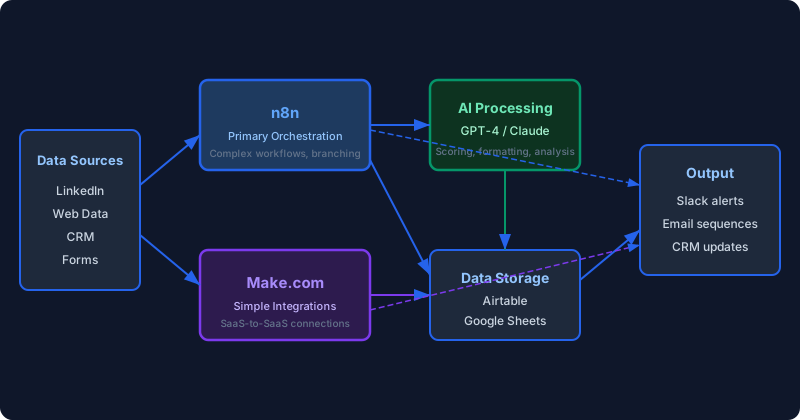
n8n is my primary orchestration layer. Self-hosted on a small server, total cost about $20/month. n8n handles the complex workflows where I need conditional logic, error handling, multiple branches, and API calls that would cost a fortune on a per-execution pricing model. The self-hosted aspect matters: I run workflows that process thousands of executions per day, and on Zapier's pricing, that would cost more per month than my entire marketing tool budget.
Make.com handles the simpler integrations. Anything that connects two SaaS tools with straightforward logic, like "when a form is submitted in Typeform, create a record in Airtable and send a Slack notification," runs on Make.com. The visual builder is genuinely intuitive, and the error handling gives you enough detail to debug problems without reading logs. For teams just starting with automation, Make.com is where I'd begin.
GPT-4 and Claude sit inside the workflows as processing nodes. Not as standalone tools. The AI isn't running the automation. It's a step inside the automation. A node that takes raw data and returns structured output. This distinction matters because most "AI automation" content treats the AI as the orchestrator, which breaks the second your prompt returns something unexpected. The workflow tool is the orchestrator. The AI is a function you call within it.
Workflow 1: Lead Enrichment Pipeline (The One That Runs While I Sleep)
This is the workflow I mentioned at the top, and it's probably saved more time than anything else I've built. Here's what it does and how it's structured.
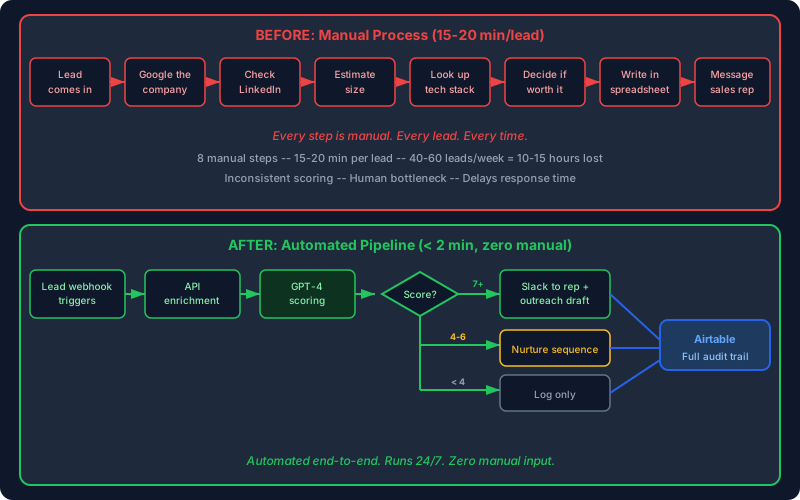
The problem it solves: A new lead comes in from a form submission, a webinar registration, or a LinkedIn interaction. Before a sales rep can do anything useful with that lead, someone needs to find the company's website, confirm the contact's role, check company size, look at their tech stack, and score whether it's worth pursuing. That process used to take 15-20 minutes per lead. Manual. Every single time.
The workflow:
- A webhook in n8n catches the new lead data (name, email, company name).
- An API call enriches the company data: website, employee count, industry, funding stage. I use a combination of public APIs and web data for this.
- GPT-4 receives the enriched data with a prompt that says: "Based on this company profile, score this lead from 1-10 on fit with our ICP. Our ICP is [specific criteria]. Return a JSON object with score, reasoning, and recommended next action."
- The workflow routes based on the score. 7+ goes directly to the assigned sales rep via Slack with a pre-written outreach suggestion. 4-6 goes into a nurture sequence. Below 4 gets logged but not actioned.
- Everything gets written to Airtable with a timestamp, the enrichment data, and the AI scoring rationale.
What actually happened when I first deployed this: The GPT-4 scoring was wildly inconsistent. Same company profile would get a 6 one day and an 8 the next. The problem was my prompt. It was too vague. "Score based on ICP fit" is not specific enough for an LLM to produce consistent output. I rewrote the prompt with explicit scoring criteria: "Company size 50-150 employees = 2 points. B2B SaaS industry = 2 points. Series A-B funding = 2 points..." and so on. Structured rubric, structured output. Consistency jumped dramatically.
The math: We process about 40-60 new leads per week. At 15 minutes per lead of manual enrichment, that's 10-15 hours of human time per week. The workflow handles it in minutes with zero human input. Even accounting for the occasional error that needs manual review (maybe 5% of leads), the net savings are north of 12 hours weekly.
Workflow 2: Content Distribution Engine
This one is simpler but surprisingly impactful. When I publish content, whether it's a blog post, a LinkedIn update, or a newsletter, the distribution used to be entirely manual. Post it, then spend 45 minutes reformatting it for different channels, scheduling it, and cross-linking.
The Make.com workflow:
- Trigger: new item appears in my content calendar (an Airtable base).
- The workflow pulls the content and metadata.
- GPT-4 reformats the content for each channel. The blog post body becomes a LinkedIn summary (120-180 words, matched to my voice guidelines). The same content becomes a tweet thread outline and an email newsletter intro.
- Each reformatted version goes to the appropriate scheduling tool or notification channel.
- A summary hits my Slack with all the formatted versions so I can review before anything goes live.
The key design decision: nothing publishes automatically. The workflow prepares everything and presents it for review. I learned early that fully automated publishing is a mistake for personal brand content. The AI reformatting is good, usually 80% there, but it always needs a human pass for tone and specificity. The automation saves me the formatting and distribution grunt work. The quality control stays human.
Workflow 3: Weekly Reporting Pipeline
Every Monday morning at 8am, I get a Slack message with a formatted report that used to take someone two hours to compile. Website traffic by source, conversion rates by page, pipeline metrics from the CRM, and a comparison against the previous week.
The n8n workflow:
- Cron trigger fires Monday at 7:30am.
- Parallel API calls pull data from GA4, the CRM, and Airtable.
- The data flows into a merge node that combines everything into one dataset.
- GPT-4 receives the combined data with a prompt: "Summarize this weekly performance data. Highlight anything that changed by more than 10% week-over-week, positive or negative. Format as a Slack message with sections for Traffic, Conversion, and Pipeline."
- The formatted report posts to Slack.
The AI summary is the part that saves the most time. Raw numbers in a spreadsheet take 20 minutes to interpret. A formatted summary with the notable changes highlighted takes 30 seconds to scan. And because the prompt specifically asks for 10%+ changes, the report filters out noise and surfaces signal.
What Breaks (And How to Build for It)
I've broken enough workflows to fill a separate article, but the patterns repeat. Here are the three failure modes that will bite you if you don't plan for them.
API responses change without warning. The enrichment API I used in the lead pipeline changed their response format in a minor update. No announcement. My workflow started throwing errors on every execution because it was looking for a field that had been renamed. Fix: always validate API responses before processing them. In n8n, I use an IF node right after every API call that checks whether the expected fields exist. If they don't, the workflow routes to an error handler that logs the issue and alerts me instead of silently failing or crashing.
AI output is non-deterministic. You send the same prompt with the same data, and sometimes you get JSON, sometimes you get markdown, sometimes you get a conversational response that starts with "Sure! Here's the scoring..." even though your prompt says "Return only JSON." Fix: always parse AI output with a try-catch pattern. Expect the unexpected. I wrap every AI response parser in error handling that catches malformed output and either retries with a stricter prompt or flags it for manual review.
Rate limits and timeouts at scale. When you're processing 60 leads at once instead of one at a time, you hit API rate limits you never encountered during testing. The workflow that works perfectly for one lead crashes spectacularly when you batch-import 200. Fix: add delays between API calls. In n8n, I use a SplitInBatches node that processes leads in groups of 10 with a 2-second pause between batches. It's slower, but it doesn't crash.
The Honest ROI Math
Let me be specific about what this stack actually costs and saves, because most "AI automation" content is suspiciously vague about the numbers.
Costs:
- n8n self-hosted: ~$20/month (server costs)
- Make.com Pro plan: $16/month
- GPT-4 API usage: ~$30-50/month (varies with volume)
- Airtable Pro: $20/month
- Total: roughly $90-100/month
Time saved:
- Lead enrichment: 12+ hours/week
- Content distribution prep: 3-4 hours/week
- Weekly reporting: 2 hours/week
- Misc automated notifications and routing: 2-3 hours/week
- Total: roughly 20 hours/week
At any reasonable hourly rate, the math is absurd. $100/month for 80+ hours of recovered time per month. Even if I'm off by half, even if the real savings are only 10 hours a week, the ROI is still overwhelming.
But here's the part nobody mentions: the first month, the ROI is negative. You're spending 20-30 hours building workflows, debugging them, rebuilding them when they break, and learning the tools. The savings don't start until month two. The compounding doesn't kick in until month three, when your workflows are stable and you start building new ones on top of a foundation that works.
This is why most teams abandon automation early. They expect the ROI from day one. The ROI comes from month two onward, and it compounds from there.
Where to Start (If You're Starting From Zero)
If your team has never built an automation workflow, don't start with the lead enrichment pipeline. That's a week-two project. Here's the sequence I'd recommend.
Week 1: Build a notification workflow. Something simple. "When a new form submission comes in, send a Slack message with the details." Use Make.com. It will take you about 30 minutes. The purpose isn't the automation itself. It's to understand the basic concepts: triggers, actions, data mapping, and what happens when something goes wrong.
Week 2: Add a data processing step. Take that form submission workflow and add an enrichment step. Look up the company domain from the email address. Pull basic info. Write it to a spreadsheet alongside the original submission. Now you've got a two-step workflow with data transformation, which is the building block of everything more complex.
Week 3: Add AI processing. Take the enriched data from week 2 and send it to GPT-4 for scoring or categorization. This is where you'll learn the hardest lesson: prompt engineering for structured output is a different skill than chatting with ChatGPT. Expect to rewrite your prompt 5-10 times before the output is consistent enough to rely on.
Week 4: Build your first real pipeline. Combine everything from weeks 1-3 into a production workflow. Add error handling. Add logging. Test it with real data, not sample data. Deploy it and monitor it daily for the first week.
By the end of month one, you'll have one working pipeline and a solid understanding of how the tools work. More importantly, you'll have a realistic sense of what's possible and what isn't, which will save you from the two most common mistakes: trying to automate everything at once, or deciding that automation "isn't for us" because the first attempt was messy.
AI Agents vs. AI Automation: The Distinction That Matters
There's a lot of buzz right now about "AI agents" in marketing. Autonomous systems that research, write, publish, and optimize without human input. I've built a few. They're impressive in demos and unreliable in production.
The problem with fully autonomous AI agents isn't capability. GPT-4 and Claude can genuinely produce good output for many marketing tasks. The problem is trust and error propagation. When an AI agent makes a decision that's 90% right, and then makes another decision based on that first decision that's also 90% right, you're already down to 81% accuracy. Chain five decisions together and you're at 59%. That's a coin flip with extra steps.
What works better, at least right now in early 2026, is AI-assisted automation. The workflow tool handles orchestration, routing, and logic. The AI handles specific processing tasks where it excels: summarization, reformatting, scoring against defined criteria, generating draft copy. A human reviews anything customer-facing before it ships.
This is less exciting than "fully autonomous AI marketing." It's also what actually works in production without generating embarrassing mistakes. I've seen enough auto-published AI content with hallucinated statistics and off-brand tone to know that the "fully autonomous" crowd is optimizing for demo impressions, not production reliability.
The Imperfectionist Take on AI Automation
My philosophy on all of this is the same as my philosophy on CRO and everything else: ship what works now. Don't wait for the perfect workflow. Don't wait for AGI to make automation "really good." Don't spend six months evaluating tools.
Pick n8n or Make.com. Build one workflow this week. It will break. Fix it. Build another one. Within 90 days, you'll have a stack that saves your team 10-20 hours per week, and you'll understand the landscape well enough to make informed decisions about what to automate next.
The teams that are winning with AI automation right now aren't the ones with the most sophisticated setups. They're the ones that started three months ago with something simple, broke it, fixed it, and kept building. The compounding effect of incremental automation is the same as the compounding effect of incremental CRO improvement. Each workflow you build makes the next one faster to build and more valuable in context.
Start small. Ship fast. Fix what breaks. The stack will compound.
If your growth team is spending more than 10 hours a week on tasks that could be automated and you're not sure where to start, that's a conversation I'm happy to have. My growth advisory engagement includes setting up automation infrastructure alongside the experimentation and CRO work. Not building your entire stack for you, but architecting the first workflows and teaching your team to build the rest.
More tactics like this, straight to your inbox.